Posts

Next Scripting Framework

Next Scripting Framework  # How to invoke current class method:   package require nx nx::Class create Greeter {     :property name:required     :public method "hello" {} {         puts "Welcome ${:name}!"         :bye     }     :public method "bye" {} {         puts "Goodbye ${:name}!"     } } Greeter create g -name Anna g hello   # Inheritance Example:   # Inheritance Example package require nx nx::Class create Animal { :property name:required :public method "hello" {} { puts "Hello cute animal with the name ${:name}!" } } nx::Class create Dog -superclass Animal { :public method "bark" {} { puts "${:name} bark! bark! bark!" } } Dog create d -name Snoopy d bark Dog create d1 -name "Bobby" d1 bark d1 hello 
Postgres select columns names without default value

 PostgreSQL select column names where there is no default value :   SELECT column_name, column_default FROM information_schema.columns WHERE (table_schema, table_name) = ('public', 'test') AND column_default IS NULL ORDER BY ordinal_position;  

TomCat Windows Login Problem

 I have installed TomCat server, added username: admin password: admin and every time I was trying to login I was back to login screen. All forums online are saying delete spaces etc. in tomcat-users.xml but the problem actually was in XML encoding. Just change this in tomcat-users.xml file: <?xml version='1.0' encoding='cp65001'?> To this: <?xml version='1.0' encoding='UTF-8'?>

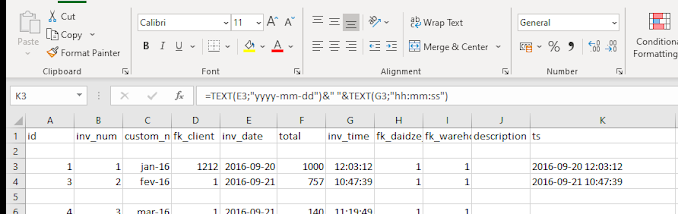
Excel CANCAT date and time to POSTGRESQL timestamp

Image
 Formula example:   =TEXT(E3;"yyyy-mm-dd")&" "&TEXT(G3;"hh:mm:ss")

C++ Linking Chilkat Linux

Create project folder, for example ~cktest: cd cktest Download C++ GCC Chilkat Library: wget https://chilkatdownload.com/9.5.0.84/chilkat-9.5.0-x86_64-linux-gcc.tar.gz tar xfz ./*.gz Move include and lib folder to cktest Create your .cpp program, for example my.cpp #include <CkJsonObject.h> #include <iostream> int ChilkatSample() { CkJsonObject json;      bool success; int index = -1; success = json.AddStringAt(-1,"Title","Pan's Labyrinth"); success = json.AddStringAt(-1,"Director","Guillermo del Toro"); success = json.AddStringAt(-1,"Original_Title","El laberinto del fauno"); success = json.AddIntAt(-1,"Year_Released",2006); json.put_EmitCompact(false); std::cout << json.emit() << "\r\n"; exit(EXIT_SUCCESS); } static int s = ChilkatSample(); int main() { std::cout << "Inside main() - dummy things"; } To compile: g++ my.cpp -I./include -L./lib -lc...

Fail2ban cheat codes

Show all rules: fail2ban-client status Show banned IP's specific rule: fail2ban-client status sshd  Unban some IP: fail2ban-client set yourjailname unbanip youripaddress  

BOOST C++ Compile VS2019

1. Download and unzip boost from https://www.boost.org/ 2. Lets say, boost unzipped to c:\downloads 3. Run "x64 Native Tools Command Prompt for VS 2019" (its important to run this one instead of power shell or normal cmd) 4. cd c:\downloads 5. .\bootstrap 6. b2 --prefix=c:\boost_libs --toolset=msvc-14.2 --address-model=64 --architecture=x86 --runtime-link=static,shared --link=static threading=multi install 7. boost will be installed in c:\boost_libs 8. In VS2019 --> Solution Explorer --> "Project" --> Properties --> C++ --> Additional Include Directories --> Add c:\boost_libs\include 9. In VS2019 --> Solution Explorer --> "Project" --> Properties --> Linker --> General --> Additional Library Directories --> Add c:\boost_libs\lib Since VS2010 there is no global directories, you need to specify per project options.

Git goodies

  Save password to git, need to enter password once after:   git config --global credential.helper store Set vim as default git editor: git config --global core.editor "vim"     See git config: git config -l

Ubuntu VM change resolution

From within the Ubuntu virtual machine, open Terminal sudo vim /etc/default/grub Find GRUB_CMDLINE_LINUX_DEFAULT="quiet splash" Append that to the end of the line "video=hyperv_fb:[specify resolution, e.g. 1024x768]" For example: GRUB_CMDLINE_LINUX_DEFAULT="quiet splash video=hyperv_fb:1024x768" Save changes and exit Run the following command: sudo update-grub Restart the VM

Wget single file from github

Image
When you view a file it has a link to the "raw" version. Click copy URL, in terminal wget (paste):  

Mapserver install on Ubuntu 18.04 with Naviserver:

Mapserver install on Ubuntu 18.04 with Naviserver: I assume you have already installed Naviserver, PostgreSQL and PostGIS. Update apt-get apt-get update Install dependencies: apt-get install libprotobuf-c-dev apt-get install protobuf-c-compiler apt-get install libjpeg-dev apt-get install libfreetype6 apt-get install libfreetype6-dev apt-get install libproj-dev apt-get install libfribidi-dev apt-get install libharfbuzz-dev apt-get install libcairo2-dev apt-get install libgeos-dev apt-get install libgdal-dev apt-get install libpixman-1-dev apt-get install libfcgi-dev Download Mapserver from http://download.osgeo.org/mapserver/mapserver-7.4.1.tar.gz Extract tar to some directory, create build directory and run from build cmake -DCMAKE_INSTALL_PREFIX=/opt/mapserver --DWITH_WITH_KML=ON -DWITH_CLIENT_WFS=ON -DWITH_CLIENT_WMS=ON -DWITH_SOS=ON --DWITH_WITH_XMLMAPFILE=ON ../ It will build and install Mapserver into /opt/mapserver

Ubuntu 17 and 18.04 permanent ressolv.conf

As always Ubuntu managed to f**k up the system. So every time you reboot system it rewrites /etc/resolve.conf with dummy config Solution: sudo apt-get purge resolvconf sudo unlink /etc/resolv.conf sudo touch /etc/resolv.conf vim /etc/resolv.conf reboot

Oracle, how to pass a '&' in url and other special characters

Function to normalize url link, substitute special characters in link: CREATE OR REPLACE FUNCTION urlencode( p_str in varchar2 ) return varchar2 AS     l_tmp varchar2(12000);     l_len number default length(p_str);     l_bad varchar2(100) default ' >%}\~];?@&<#{|^[`/:=$+''"' || chr(10);     l_char char(1); BEGIN     IF ( p_str is NULL ) then         RETURN NULL;     END IF;     FOR i IN 1 .. l_len LOOP         l_char := substr(p_str,i,1);         IF ( instr( l_bad, l_char ) > 0 )         THEN             l_tmp := l_tmp || '%' || to_char(ascii(l_char), 'fm0X');         ELSE             l_tmp := l_tmp || l_char;         END IF;     END LOOP; RETURN l_tmp; END; Example: SET ...
Check if  UTL_HTTP  exists: I have seen on the internet someone complain about not existing "UTL_HTTP" SELECT * FROM dba_objects WHERE object_name='UTL_HTTP' Login do sqlplus: sys as sysdba Grant execute to user, in my case im using system user (I know bad idea): GRANT EXECUTE ON SYS.UTL_HTTP TO system; Create ACL, you need this if yo are using 11g or up: pay attention to principal it has to be UPPERCASE, if not it will give you "ORA-44416 Unresolved Principal" error BEGIN DBMS_NETWORK_ACL_ADMIN.create_acl( acl => 'http_connect.xml', description => 'ACL that lets me talk to the my web server', principal => 'SYSTEM', is_grant => TRUE, privilege => 'connect' ); DBMS_NETWORK_ACL_ADMIN.assign_acl( acl => 'http_connect.xml', HOST => 'maks.tk', lower_port =...

Certbot

List all certificates: sudo certbot certificates Create wildcard certificate for domain example.com:  sudo certbot certonly --manual --preferred-challenges dns --server https://acme-v02.api.letsencrypt.org/directory --manual-public-ip-logging-ok -d '*.example.com' -d <example.com> Delete certificate:  sudo certbot delete Get certificate with HTTP challenge, From root folder .well-known/acme-challenge/[Some randome filename from lets encrypt]  certbot certonly --manual --preferred-challenges http --email youremail@mail.com -d example.com -d example.org

Increase DBMS_OUTPUT

DBMS_OUTPUT has different default buffer sizes, depending on your Oracle version. You can increase the buffer up to 1,000,000 using the following PL/SQL statement: DBMS_OUTPUT.ENABLE(1000000); The SQL*Plus statement to achieve the same result is: SET SERVEROUTPUT ON SIZE 1000000 Starting with Oracle release 10g, it is possible to use the following unlimited buffer settings: DBMS_OUTPUT.ENABLE (buffer_size => NULL);

PL/SQL Write BLOB to file

PL/SQL Write BLOB to file (temp file): in my case I have a table with BLOB column, I keep my pdf files inside, and I need to save them in temp directory. This procedure accepts 3 arguments: BLOB, directory name to save into and file name: CREATE OR REPLACE PROCEDURE write_pdf(v_blob IN BLOB, p_directory IN VARCHAR2, p_filename IN VARCHAR2 ) IS v_length INTEGER; v_index INTEGER := 1; v_bytecount INTEGER; v_tempraw RAW(32767); v_file UTL_FILE.file_type; BEGIN v_file := UTL_FILE.fopen(p_directory, p_filename, 'wb', 32767); v_length := DBMS_LOB.getlength(v_blob); WHILE v_index <= v_length LOOP v_bytecount := 32767; DBMS_LOB.read(v_blob, v_bytecount, v_index, v_tempraw); UTL_FILE.put_raw(v_file, v_tempraw); UTL_FILE.fflush(v_file); ...

Work with directories Oracle PL/SQL

Work with directories Oracle PL/SQL: Create(add) temp directory on c:\ referenced as DIR_TEMP CREATE DIRECTORY DIR_TEMP AS 'C:\temp'; List all directories by system user: SELECT * FROM all_directories;

Find duplicates in Postgres table and remove them

 To find all duplicates in table: SELECT name, COUNT( name ) FROM client GROUP BY name HAVING COUNT( name )> 1 ORDER BY name; To remove one: DELETE FROM client a USING client b WHERE a.id < b.id AND a.name = b.name;

Notepad++ Tips

Sometimes you need to remove ids from sql dump. For example: INSERT INTO public.dcicv VALUES (4, 'Benzilpenicilina Benzatínica', 'Antibacterianos', 'Penicilinas'); INSERT INTO public.dcicv VALUES (5, 'Procaína', 'Antibacterianos', 'Penicilinas'); INSERT INTO public.dcicv VALUES (6, 'Benzilpenicilina procaínica', 'Anti-infeciosos',  'Penicilinas'); convert to : INSERT INTO public.dcicv VALUES ( 'Benzilpenicilina Benzatínica', 'Antibacterianos', 'Penicilinas'); INSERT INTO public.dcicv VALUES ( 'Procaína', 'Antibacterianos', 'Penicilinas'); INSERT INTO public.dcicv VALUES ( 'Benzilpenicilina procaínica', 'Antibacterianos', 'Penicilinas'); just do replace regular expression: [0-9]+(\,)