Posts

Certbot

List all certificates: sudo certbot certificates Create wildcard certificate for domain example.com:  sudo certbot certonly --manual --preferred-challenges dns --server https://acme-v02.api.letsencrypt.org/directory --manual-public-ip-logging-ok -d '*.example.com' -d <example.com> Delete certificate:  sudo certbot delete Get certificate with HTTP challenge, From root folder .well-known/acme-challenge/[Some randome filename from lets encrypt]  certbot certonly --manual --preferred-challenges http --email youremail@mail.com -d example.com -d example.org
Increase DBMS_OUTPUT

DBMS_OUTPUT has different default buffer sizes, depending on your Oracle version. You can increase the buffer up to 1,000,000 using the following PL/SQL statement: DBMS_OUTPUT.ENABLE(1000000); The SQL*Plus statement to achieve the same result is: SET SERVEROUTPUT ON SIZE 1000000 Starting with Oracle release 10g, it is possible to use the following unlimited buffer settings: DBMS_OUTPUT.ENABLE (buffer_size => NULL);

PL/SQL Write BLOB to file

PL/SQL Write BLOB to file (temp file): in my case I have a table with BLOB column, I keep my pdf files inside, and I need to save them in temp directory. This procedure accepts 3 arguments: BLOB, directory name to save into and file name: CREATE OR REPLACE PROCEDURE write_pdf(v_blob IN BLOB, p_directory IN VARCHAR2, p_filename IN VARCHAR2 ) IS v_length INTEGER; v_index INTEGER := 1; v_bytecount INTEGER; v_tempraw RAW(32767); v_file UTL_FILE.file_type; BEGIN v_file := UTL_FILE.fopen(p_directory, p_filename, 'wb', 32767); v_length := DBMS_LOB.getlength(v_blob); WHILE v_index <= v_length LOOP v_bytecount := 32767; DBMS_LOB.read(v_blob, v_bytecount, v_index, v_tempraw); UTL_FILE.put_raw(v_file, v_tempraw); UTL_FILE.fflush(v_file); ...

Work with directories Oracle PL/SQL

Work with directories Oracle PL/SQL: Create(add) temp directory on c:\ referenced as DIR_TEMP CREATE DIRECTORY DIR_TEMP AS 'C:\temp'; List all directories by system user: SELECT * FROM all_directories;

Find duplicates in Postgres table and remove them

 To find all duplicates in table: SELECT name, COUNT( name ) FROM client GROUP BY name HAVING COUNT( name )> 1 ORDER BY name; To remove one: DELETE FROM client a USING client b WHERE a.id < b.id AND a.name = b.name;

Notepad++ Tips

Sometimes you need to remove ids from sql dump. For example: INSERT INTO public.dcicv VALUES (4, 'Benzilpenicilina Benzatínica', 'Antibacterianos', 'Penicilinas'); INSERT INTO public.dcicv VALUES (5, 'Procaína', 'Antibacterianos', 'Penicilinas'); INSERT INTO public.dcicv VALUES (6, 'Benzilpenicilina procaínica', 'Anti-infeciosos',  'Penicilinas'); convert to : INSERT INTO public.dcicv VALUES ( 'Benzilpenicilina Benzatínica', 'Antibacterianos', 'Penicilinas'); INSERT INTO public.dcicv VALUES ( 'Procaína', 'Antibacterianos', 'Penicilinas'); INSERT INTO public.dcicv VALUES ( 'Benzilpenicilina procaínica', 'Antibacterianos', 'Penicilinas'); just do replace regular expression: [0-9]+(\,)

ImageMagick Resize the width, adding a prefix to the same names in current directory under Windows 7

Image
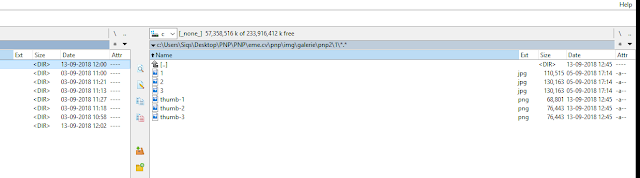
ImageMagick Resize the width, adding a prefix to the same names in current directory under Windows 7: & 'C:\Program Files\ImageMagick-7.0.8-Q16\convert.exe' -strip -thumbnail '250x>' *.jpg -set filename:area "thumb-%t" ./%[filename:area].png Result:  1.jpg --> thumb-1.png 2.jpg --> thumb-2.png 3.jpg --> thumb-3.png 4.jpg --> thumb-4.png